Design in Salesforce
Build forms from a native managed package workspace that follows Salesforce data, users, and setup patterns.

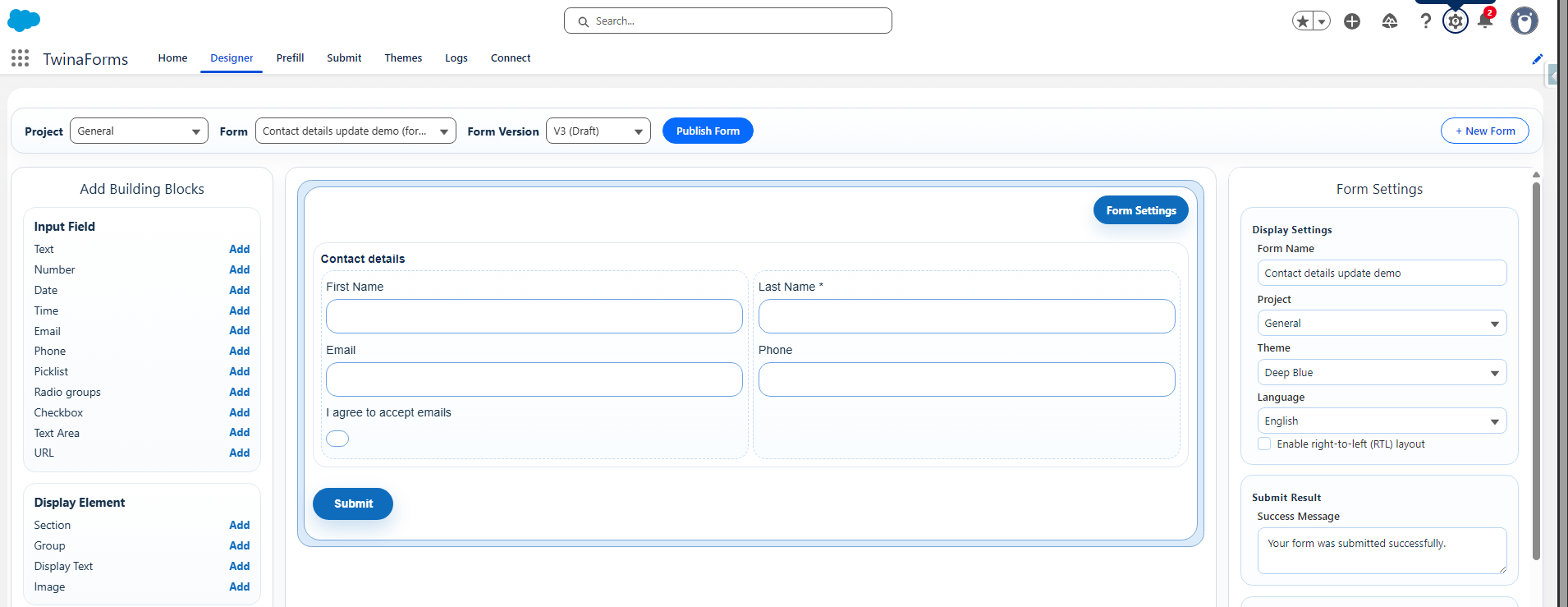
Native Salesforce forms
TwinaForms is a native Salesforce app that helps teams create public forms, prefill known data, collect submissions, and write results back to Salesforce without building a custom portal.
Its standout shortcut, One-Click Page Layout to Form, builds a working, published public form straight from any Salesforce page layout — with field selection, layout, prefill, and submit settings all configured automatically.
What it does
TwinaForms gives Salesforce teams a practical path from form design to secure public publishing, without turning every request into a custom portal project.
Build forms from a native managed package workspace that follows Salesforce data, users, and setup patterns.
Publish public HTML forms through the TwinaForms AWS layer while keeping the Salesforce org connected through controlled setup.
Use Salesforce data to reduce typing and guide customers through forms that already know the right context.
Submit records back into standard or custom Salesforce objects using configured submit actions.
Why teams choose it
Form designers work from Salesforce tabs with simple UX instead of switching to a separate form-builder account for daily work.
Add a verification step before users can access the form, using a one-time code sent to their email. Ideal for protecting existing contacts' info and prefill data.
Create a form based on a Salesforce object page layout in one click, including prefill and submission settings.
Solutions
One TwinaForms setup, many concrete use cases. Start with the recommended solution pages — more on the way.
Collect contractor, consultant, and employee hours through a public form, written straight to Salesforce — no Salesforce login for the people filling it in. Verified user identity, signed PDF receipt, mobile responsive — native to Salesforce.
For nonprofit volunteer hours, donor self-updates, and grant intake. Page in development.
In development
Let contacts and donors update their own records, prefilled and verified, without exposing data.
In development
Client onboarding, case intake, and program/grant intake forms with signed PDF on file.
In development
Security and trust
TwinaForms keeps form design and data access inside Salesforce, and uses AWS for secure published form delivery, storage, and runtime processing.
Form data is written back to Salesforce, where your team already manages users, permissions, records, and business processes.
Published forms run on AWS, one of the world’s most trusted cloud platforms for secure hosting, storage, and application delivery.
Files uploaded through Pro forms are scanned by AWS before they can be attached to Salesforce records.
Operational logs and service data are encrypted on AWS. Customer-facing access to submitted business data stays in Salesforce.
TwinaForms is designed so business users work in Salesforce, while AWS handles secure delivery and processing behind the scenes.
Plans
Every plan keeps the same native TwinaForms foundation. Upgrade when you need more forms, more volume, or advanced Pro behavior.
Free
$0 / month
Start with a small live workspace and the core TwinaForms experience.
Starter
$60 / month
Nonprofit discount available
Reliable public forms, create your firs form in aclick directly from page layout .
Pro
$400 / month
Nonprofit discount available
For richer processes with advanced actions, repeatable data, and custom form behavior.
Trial
$0 for 30 days
Try the advanced TwinaForms features before choosing a paid plan.
All advanced TwinaForms capabilities — across Starter and Pro — with the practical detail behind each one.
Show, hide, or control behavior based on multiple form conditions and grouped logic.
Create a draft form based on a Salesforce object page layout.
Add a verification step before users can access the form, using a one-time code sent to their email.
Add rating, NPS, Likert, ranking, and satisfaction fields to Pro forms.
Collect and submit multiple rows of related records like products, household members, or case items in one form.
Add a grouped country, state/region, and city autocomplete field backed by TwinaForms AWS location data, with no Google API key or Google billing required.
Collect file uploads that are scanned by AWS for malware before they are attached to Salesforce records.
Capture drawn signatures and attach them to submitted Salesforce records.
Write agreement-style rich text and insert Salesforce prefill values such as contact names before collecting a signature.
Generate values automatically inside the form using Excel-style formulas and other field values.
Redirect to a new form after submission.
Use richer prefill and submit flows like find-and-update or update-by-id for more advanced Salesforce writeback behavior.
Generate a readable PDF copy of submitted responses, including any captured signatures, and attach it to Salesforce records.
Run supported TwinaForms custom JavaScript in published forms for advanced behavior.
See richer troubleshooting detail for submissions, runtime behavior, and processing outcomes.
Install the managed package directly into a Salesforce sandbox and run a real form end-to-end. The AppExchange listing is in progress — for plan questions or upgrade conversations, email supportat@twinaforms.com.
About
TwinaForms is a product of Harmony-IT, created by Salesforce admins and developers with more than 10 years of experience delivering practical Salesforce solutions. The product is shaped around the kind of setup, permissions, troubleshooting, and reliability concerns that real Salesforce teams face every day.