Manual rekey, every week
Contractors send weekly timesheets by email or spreadsheet. An admin retypes the hours into Salesforce. The work compounds at scale — ten contractors equals hours of weekly busywork that nobody owns.
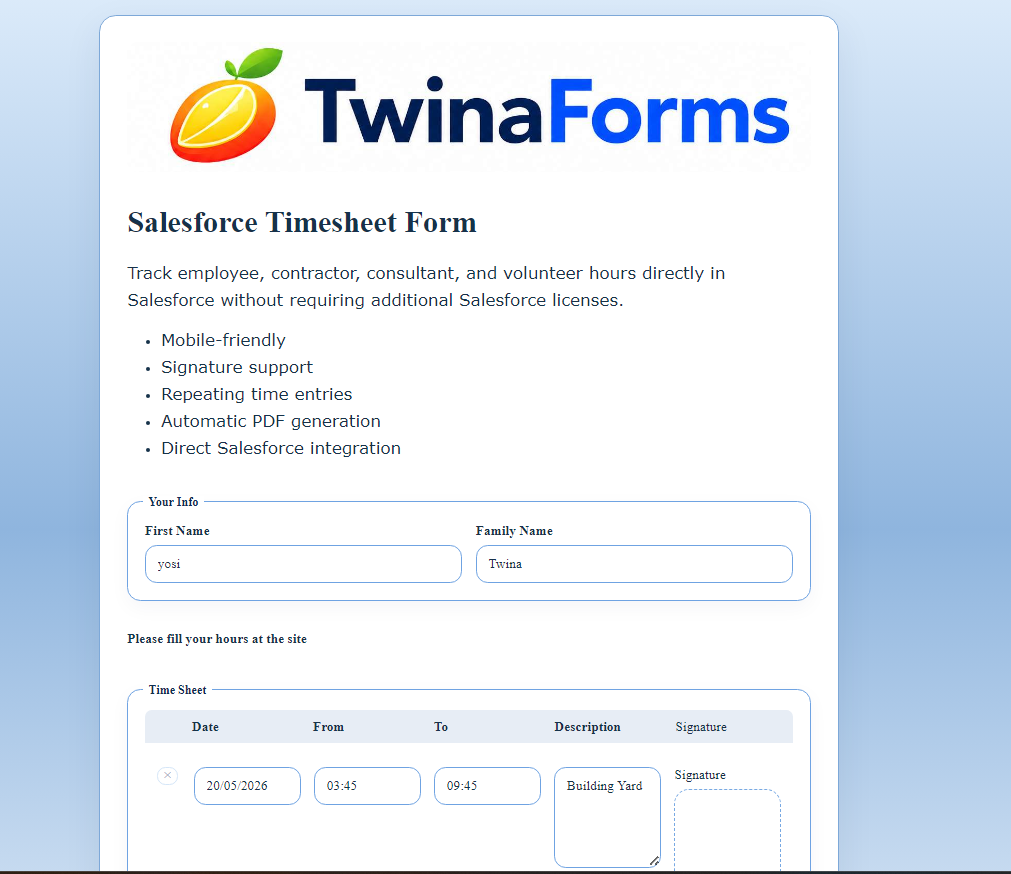
Salesforce Timesheet Form
Only verified users can submit. Each contractor, consultant, or employee signs in with a one-time email code, fills weekly time entries, signs at the bottom, and submits — from any phone. Every hour lands on the right Salesforce record with a signed PDF attached.
The problem
Whether you’re paying contractors, billing consultant time to clients, or recording employee hours for grant or project allocations, you’re probably stitching something together today to collect timesheets.
Most teams reach for Excel spreadsheets that sprawl, Google Forms that doesn’t write to Salesforce, Salesforce Screen Flows that require a per-user license, Salesforce Experience Cloud portals that need a portal-grade project to build, or Salesforce Field Service modules sized for technicians on jobs rather than consultants billing project hours.
They all break down for the same reason: there is no native, public Salesforce timesheet form that the worker can sign and submit themselves.
Contractors send weekly timesheets by email or spreadsheet. An admin retypes the hours into Salesforce. The work compounds at scale — ten contractors equals hours of weekly busywork that nobody owns.
A billing dispute lands and there’s no signed copy of what the contractor actually claimed. The Salesforce timesheet record has the numbers, but no signature, no PDF, nothing to forward to the client.
Every contractor uses their own template. Currencies drift, time formats drift, project codes drift. Reconciling weekly billable hours becomes a part-time job.
Approvals happen over Slack or email. Payroll asks for signed PDFs. Admins generate them by hand from raw spreadsheet data — or skip the signed copy entirely and hope nobody asks later.
The solution
TwinaForms is a native Salesforce form builder. Build a weekly timesheet form in your Salesforce org, share the public link with contractors, consultants, or employees, and every signed submission lands on the right record automatically — with a PDF receipt attached.
Each contractor, consultant, or employee signs in with a one-time email code sent to the address on their Salesforce Contact record. No code, no submission — the form simply won’t open. Stops anonymous, duplicate, or spoofed timesheet entries before they reach Salesforce.
Contractors and employees add as many project rows as they worked on that week — each row writes a separate Salesforce Timesheet Entry record, totalled on the parent Timesheet record.
The contractor or employee’s name, project picklist, and billing rate are prefilled from their Salesforce Contact record. They only enter the hours and notes.
The contractor, consultant, or employee signs at the bottom of the form. A PDF receipt — same fields, same signature — is generated and attached to the Salesforce timesheet record on submit. Payroll never asks for a signed copy again.
Contractors and employees aren’t always at a desk. The timesheet form, verification step, signature pad and submit flow all work on phones — no app to install, no separate mobile portal.
Submissions write to any standard or custom Salesforce object. Approvals, reports, dashboards work out of the box because the data lives in Salesforce, not a third-party tool.
How it works
Each piece is a TwinaForms capability you’ll find listed on the homepage. The timesheet form is what happens when you combine them in one form — for contractors, consultants, and employees alike.
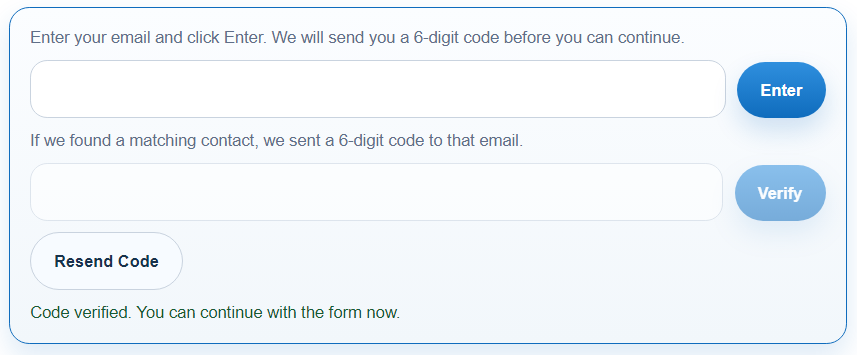
Before the timesheet form opens, the contractor receives a one-time 6-digit code by email at the address on their Salesforce Contact record. They enter the code, the session opens, and they fill the form. No code, no access — the form simply will not load.
This blocks anonymous, spoofed, or accidentally-shared timesheet submissions at the door. Every hour that lands in Salesforce is tied to a confirmed email identity, and the verification event itself is logged for audit. Combined with the signed PDF below, you get a defensible billing artifact: this contractor, this signature, this submission.
A standard form gives you one set of fields, one submission, one Salesforce record. A weekly timesheet needs many rows in one submission — one per project, day, or task.
TwinaForms Repeated Records lets you define a row layout (project + Mon–Fri hours, or whatever shape you need) and the contractor or employee adds as many rows as they worked. On submit, each row becomes a separate Salesforce record on the child object, all linked to the parent Timesheet record.

Every contractor, consultant, or employee receives a personalised link. When they open the form (after verification), TwinaForms prefills their name, contact info, the project picklist (filtered to their active assignments), and their billing rate or cost rate — all read straight from their Salesforce Contact and related records.
The contractor or employee only types what changes week-to-week: hours and short notes. No retyping a master list. No "what was that project code again?" emails.
Contractors and employees aren’t always at a desk. They’re between client visits, on a job site, at a customer location, or on the train home Friday evening. The TwinaForms Salesforce timesheet form is fully mobile responsive — the verification step, the multi-row timesheet table, the signature pad, and the submit flow all work on phones.
No mobile app to install. No separate "mobile portal" to build. The same URL works on desktop, tablet, and phone, and the contractor, consultant, or employee signs with a finger if they’re on a touchscreen.

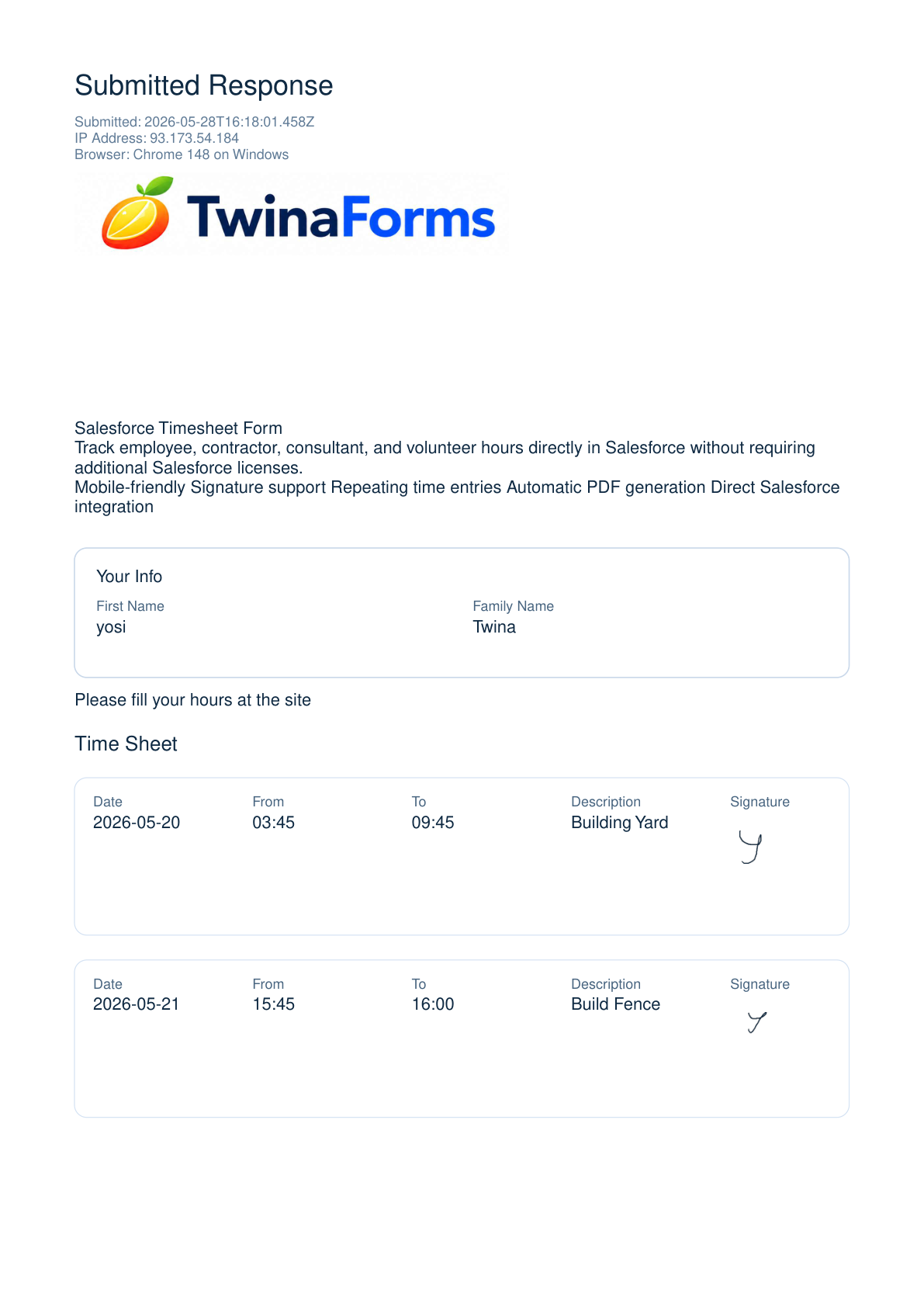
At submit, two things happen automatically. First, TwinaForms generates a signed PDF receipt — the same project rows, the same totals, the same drawn signature — and attaches it as a Salesforce File on the parent Timesheet record. Second, the structured data is written into Salesforce as records: a parent Timesheet plus one Timesheet Entry row per project.
The PDF is the artifact — what you forward to payroll, finance, or the client for billing. The records are the data — what powers your existing Salesforce approval processes, reports, and dashboards out of the box. Both come from one submit. No third-party tool to sync, no manual PDF generation, no DocuSign add-on.
Install the TwinaForms managed package into a Salesforce sandbox, turn a page layout into a form, and have a working signed timesheet form ready to share with one contractor in under an hour. For setup questions, email supportat@twinaforms.com.
FAQ
When a contractor opens the form link, TwinaForms sends a one-time verification code to the email address on their Salesforce Contact record. They enter the code, the session opens, and they can fill the timesheet. If the code is wrong or never entered, the form does not open. This blocks anonymous, spoofed, or shared-link timesheet submissions before they reach Salesforce.
Yes. The timesheet form is fully mobile responsive — the verification step, the multi-row time entry table, the signature pad, and the submit flow all work on phones and tablets. The contractor signs with a finger on touchscreens. No mobile app or separate portal to build.
Yes. The TwinaForms Repeated Records feature lets the contractor add as many rows as they need in a single submission — each row writes a separate Salesforce record (typically a Timesheet Entry), and the header writes the parent Timesheet record.
TwinaForms captures a drawn signature inside the form and embeds it into an auto-generated PDF receipt. The signed PDF is attached to the Salesforce timesheet record on submit. Combined with TwinaForms email verification, this gives you a defensible audit trail for payroll or client billing. Consult your legal team for jurisdiction-specific e-signature requirements.
No. TwinaForms writes to any standard or custom Salesforce object, so you can point the timesheet form at existing objects or create new ones in minutes — no Apex required.
Salesforce Flow screen flows are powerful for internal Salesforce users — but they break down fast for timesheet collection at scale. Here’s the honest comparison.
Licensing. Screen flows require every user who fills the timesheet to have a Salesforce license. A 1099 contractor, an external consultant, or a staff member at a partner agency without a Salesforce seat cannot use a Flow at all. Per-user Salesforce licenses range from roughly $25 to $165+ per month depending on edition — for 20 timesheet submitters that’s $500 to $3,300 a month just to log hours. A TwinaForms public timesheet form is reachable by anyone with the form link. No Salesforce login required, no license cost per submitter.
Authentication and security. Flow relies on Salesforce SSO. TwinaForms uses email-code verification — the worker enters their email, receives a 6-digit one-time code at the address on their Salesforce Contact record, and only then sees the form. Same defensible audit trail, no Salesforce login needed.
Signature and signed PDF. Flow has no native signature field and no built-in PDF receipt generator. To get there you wire up DocuSign or a custom LWC/Apex component — both add cost and maintenance. TwinaForms captures a drawn signature inside the form and auto-generates a signed PDF attached to the Salesforce timesheet record on submit.
Mobile experience. Flow screen flows are designed for the Salesforce mobile app, not for external workers on their personal phone browser. TwinaForms forms are fully responsive — verification, multi-row time entry, signature pad, and submit all work on a phone with no app to install.
When Flow is the right choice. Internal Salesforce-licensed employees doing lightweight time corrections, or admin-only workflows where Salesforce login is already standard. Anything else — contractors, consultants, hourly staff at partner orgs, anyone without a Salesforce seat — needs a public timesheet form.
Send each contractor a TwinaForms timesheet form link. They fill weekly time entries, sign at the bottom, and submit. Each entry lands as a Salesforce record automatically. A signed PDF copy of the timesheet is attached to the record for payroll and billing reference.
Yes. Consultants enter billable hours per client or project per row, with the form prefilling their billing rate from the contact record. The form totals the hours and the auto-generated signed PDF is a ready-to-attach billing artifact.
Yes. Same form, same Repeated Records, same signed PDF — it works for W-2 employees, hourly staff, project teams, or anyone you need verified weekly time data for. Hours land on the same Salesforce object you point the form at — typically a Timesheet plus Timesheet Entry custom object. For grant- or project-funded employee time, the Repeated Records table can carry the project or grant code per row, so each entry maps to the right allocation. Verification ensures the right employee is logging the right hours; the signed PDF gives HR or finance a defensible audit copy.
Ready to ship it
Free to install. Pro plan unlocks the signature, PDF receipt, and Repeated Records features used in the timesheet form on this page. Nonprofit discount available.